Enhance your desktop audio experience with our guide to the best computer speakers in Canada. We’ve reviewed top models based on sound quality, connectivity options, and desktop-friendly design.
Do you spend your free time gaming on your computer? Or maybe browsing for new artists with amazing songs to add to your playlists? No matter what type of audio-related activities you’re enjoying regularly, sound quality matters. And if you want the best possible listening experience, you’re going to want the best tech, right?
Computer speakers are compact, high-powered alternatives to your computer’s built-in speakers. They offer a much better sound profile, a louder volume potential, and the ability to truly immerse yourself in your games, music, YouTube videos, and so much more. They’re really easy to connect, too, since most of them are outfitted with Bluetooth.
If you’re ready to upgrade your existing computer speakers, or you’re buying as a first-timer, we’re here to help. Computer speakers will vary in a ton of features, including price, overall size, number of pieces, connectivity options, and sound quality. You’ll want to think about each and every feature to make sure you find your perfect match.
This comprehensive guide will investigate the best computer speakers in Canada right now and outline the criteria you should consider while making your purchase decision. Let’s dive right into our top five products.
The Best Computer Speakers Right Now
- Top Pick: Edifier M60 Multimedia Speakers
- 2.1 Pick: Logitech Z623 400-Watt Home Speaker System
- Upgrade Pick: JBL 305PMKII Professional Studio Monitor
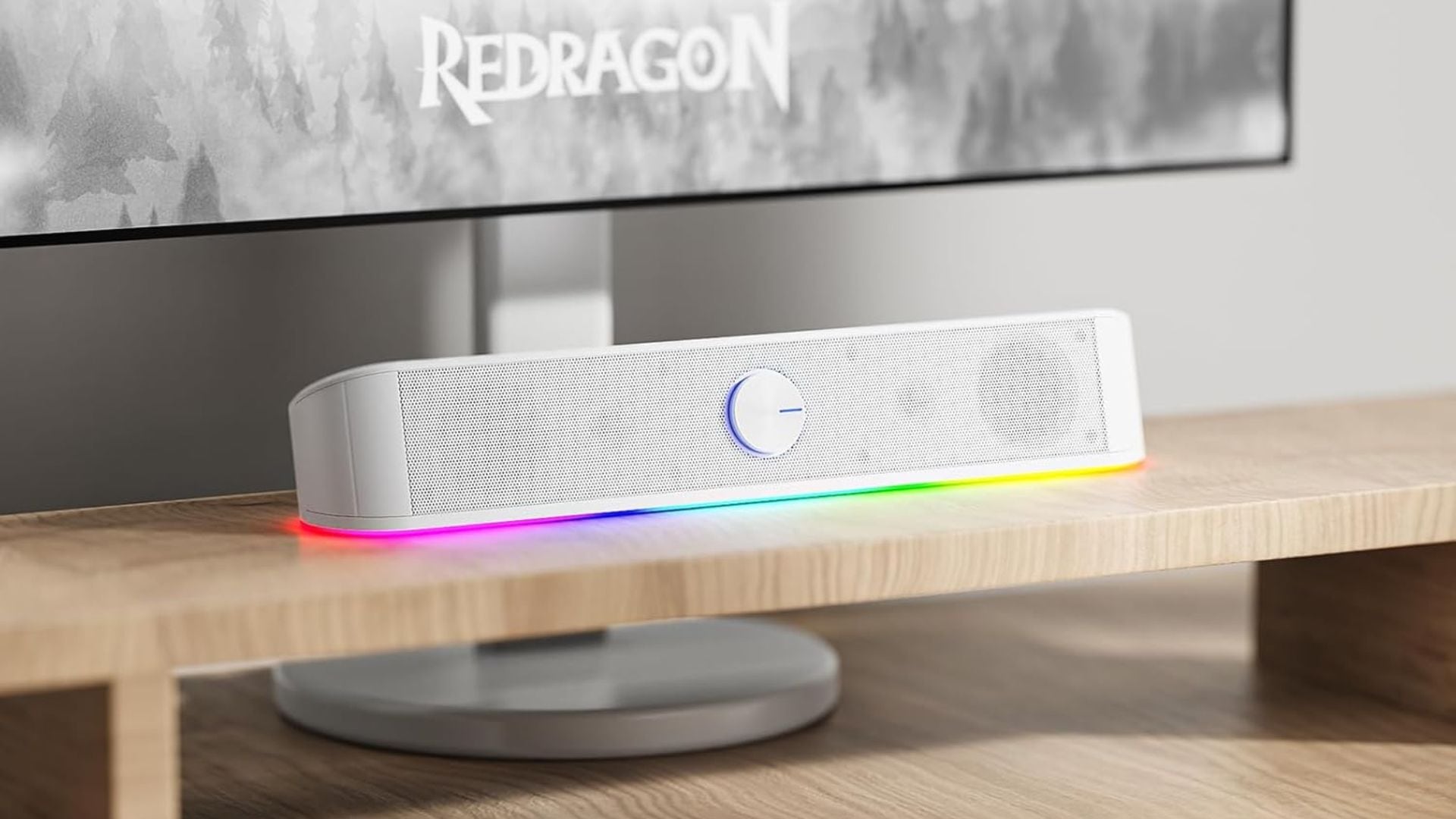
- Soundbar Pick: Redragon GS560 Adiemus RGB Desktop Soundbar
- Budget Pick: Creative Pebble V2 Minimalistic 2.0 USB-C Powered Desktop Speakers
Our Top Pick for the Best Computer Speakers
Edifier M60 Multimedia Speakers Review
What We Think of the Edifier M60 Multimedia Speakers
There are a lot of things to like about the Edifier M60 Multimedia Speakers. One of the things we like best is the connectivity. In addition to reliable Bluetooth, you can also use a USB-C cable or an AUX cord for a wired connection. Every device can connect seamlessly! These speakers also connect to a companion app on your smartphone so you can customize the sound profile. Doesn’t that sound great?
The sound quality of these speakers doesn’t disappoint, either. You’ll be treated to high-resolution, balanced sound that makes every audio source sound its best, whether it’s games, music, shows, or anything else. You’ll even get a couple of speaker stands included with the speakers so you can elevate the sound even more. It just doesn’t get better!
There are only a couple of reasons these speakers might not be your perfect fit, but we think most people will be able to look past them quite easily. The first potential concern is the price. These speakers aren’t the most affordable things on the planet, so they won’t work for every budget. Second, they aren’t super portable, so they’ll do best with a secure setup at home.
All in all, the Edifier M60 Multimedia Speakers are as close to flawless as these things can get. No matter what your priorities are for a new speaker set, this duo will meet and then exceed your expectations.
- Performance: 5/5
- Usability: 5/5
- Price: 4/5
- Quality: 5/5
What Reviewers Are Saying About the Edifier M60 Multimedia Speakers
Reviewers are extremely happy with the Edifier M60 Multimedia Speakers. They produce excellent sound without taking up too much space on the desk, and the companion app makes it really easy to customize the sound profile. They also appreciate the connectivity options and how user-friendly the backlit controls are. They couldn’t ask for anything better.
Edifier M60 Multimedia Speakers Pros and Cons
Buy If…
- High-resolution audio is what you’re after
- You’ll make use of wireless and wired connectivity options
- You’d love to get speaker stands included
- You’d appreciate a companion app
Don’t Buy If…
- You’re shopping on a budget
- You’d like to travel with your speakers occasionally
Edifier M60 Multimedia Speakers Specifications
- Number of Pieces: 2
- Dimensions: 3.9” x 5.8” x 6.6” each
- Weight: 10.4 lbs
- Connectivity: Bluetooth, USB-C, and AUX
- Warranty: 2 years
Our 2.1 Pick
Logitech Z623 400-Watt Home Speaker System Review
What We Think of the Logitech Z623 400-Watt Home Speaker System
We have lots of exciting things to tell you about the Logitech Z623 400-Watt Home Speaker System. One of its most compelling features is, of course, its audio quality. With a massive subwoofer and two satellites working in concert, your space can become a true entertainment centre. Adjustments to volume and bass are easy, too, with user-friendly dials on one of the satellite speakers.
Connectivity will be another thing in the pro column for this system. You can make use of two wired connection options (RCA and AUX) and connect up to three devices at once for seamless audio switching. These speakers are compatible with all kinds of devices, too, from computers to gaming consoles to televisions. Every device deserves high-class sound, right?
The only reason you might choose to go with a different option is the lack of wireless connectivity. The only way to connect devices to this speaker system is through an AUX cable or the RCA inputs. If you’re looking for the convenience of Bluetooth connectivity, you’ll have to look elsewhere. If wired connections don’t bother you, you won’t dislike anything about these speakers!
All in all, the Logitech Z623 400-Watt Home Speaker System has more to offer than you’d expect at first glance. If superb audio quality, simple controls, and great device compatibility appeal to you, this is the speaker system to get.
- Performance: 5/5
- Usability: 4.5/5
- Price: 3.5/5
- Quality: 5/5
What Reviewers Are Saying About the Logitech Z623 400-Watt Home Speaker System
Reviewers are very impressed by the Logitech Z623 400-Watt Home Speaker System. Most of them agree that it’s the best 2.1 system available right now. They can get very loud without distorting sound, and the simple dial controls on the right satellite speaker make it very user-friendly. They couldn’t ask for better audio quality. Some people would prefer Bluetooth connectivity, though.
Logitech Z623 400-Watt Home Speaker System Pros and Cons
Buy If…
- You’re looking for studio-quality audio
- You’d like to connect multiple devices at once
- You don’t want to worry about device compatibility
- Simple controls appeal to you
Don’t Buy If…
- You’re looking for Bluetooth connectivity
Logitech Z623 400-Watt Home Speaker System Specifications
- Number of Pieces: 3
- Weight: 18.1 lbs
- Connectivity: AUX and RCA
Our Upgrade Pick
JBL 305PMKII Professional Studio Monitor Review
What We Think of the JBL 305PMKII Professional Studio Monitor
The JBL 305PMKII Professional Studio Monitor arguably has the best sound quality in the arena. It produces a very honest sound, so if you’re using it to produce music, you’ll be able to appreciate a good mix and notice any flaws that need correction. There’s no over-production with this one. It also has multiple features working together to create a wonderfully low bass range. Finally, right?
One of the more unique features of this speaker is the fact that it can be mounted on the wall. You’ll be able to keep your desk space free for other things! Plus, no matter where you put it in the room, you’ll experience a nearly flawless frequency response even if you’re listening off-axis. This speaker couldn’t sound bad if it tried! It’s also incredibly durable, so it can take a lot of playtime and even some knocks without fear.
There are only two possible reasons we think you might want to keep looking. First, this monitor isn’t compatible with Bluetooth, so you’ll need a wired connection to get your sound moving through — not ideal in all spaces, we know. It also comes as a singleton, so if you’re looking for a set to balance the aesthetic in your space, you’ll need to buy multiple or just look for something else.
All in all, the JBL 305PMKII Professional Studio Monitor is an amazing choice if you’re in the market for a single speaker that can be positioned anywhere in your space without compromising sound quality. You truly won’t hear audio like this anywhere else.
- Performance: 5/5
- Usability: 5/5
- Price: 3.5/5
- Quality: 5/5
What Reviewers Are Saying About the JBL 305PMKII Professional Studio Monitor
Reviewers are incredibly happy with the quality of the JBL 305PMKII Professional Studio Monitor. It produces next-level sound and has a surprisingly low bass range considering its size. It does a great job of minimizing distortion, and the wall mount option helps them clear up some desk space. They’re also pleased by how solid it feels — they expect to get years of use out of it.
JBL 305PMKII Professional Studio Monitor Pros and Cons
Buy If…
- You love a good bass in your music
- You’ll be listening off-axis
- Longevity is important to you
- You’d love to mount your speaker on a wall
Don’t Buy If…
- You’d prefer a speaker set for aesthetic reasons
- Bluetooth connectivity is ideal
JBL 305PMKII Professional Studio Monitor Specifications
- Number of Pieces: 1
- Dimensions: 11.7” x 7.3” x 9.1”
- Weight: 10.4 lbs
- Connectivity: Auxiliary
Our Soundbar Pick
Redragon GS560 Adiemus RGB Desktop Soundbar Review
What We Think of the Redragon GS560 Adiemus RGB Desktop Soundbar
We are very excited to introduce you to the Redragon GS560 Adiemus RGB Desktop Soundbar. One of the first things you’ll notice is its affordable price tag. If you’re shopping on a budget, this soundbar is still a really great option. The speaker’s controls are user-friendly, too, and take the form of a volume dial out front and touch controls on the top. It’s easy to get your speaker performing exactly the way you need it to.
The RGB lighting is probably the feature that adds the most fun to your audio. With four modes, you can enjoy a subtle glow or set up dynamic or audio-sync lighting to elevate any occasion. You won’t be disappointed with the audio quality, either. It’s quite well-balanced and is especially clear with mids and highs, so it’s perfect for most computer-based activities.
There are also two shortcomings that we want you to be aware of before deciding if this soundbar speaker is the right choice. First, it doesn’t offer any Bluetooth connectivity, so you’ll need to have an AUX cord handy in order to use it. Second, it isn’t large enough or high-powered enough to produce a heavy-hitting base, so if you’re looking for that, a different speaker will be a better choice.
All in all, the Redragon GS560 Adiemus RGB Desktop Soundbar is our favourite option for people who have settled on a soundbar. Its low profile allows it to fit well on any desk, and the clear audio is perfect for all kinds of activities. You can’t beat the price, either. Is it your perfect fit?
- Performance: 4.5/5
- Usability: 4.5/5
- Price: 5/5
- Quality: 4.5/5
What Reviewers Are Saying About the Redragon GS560 Adiemus RGB Desktop Soundbar
Reviewers are very pleased with the Redragon GS560 Adiemus RGB Desktop Soundbar for the most part. Some people would prefer that it offered better bass, but for its size and USB power source, it performs quite well. Everyone is pleased with the RGB effects and the user-friendly volume dial and touch controls. It’s the perfect size for every desktop, too.
Redragon GS560 Adiemus RGB Desktop Soundbar Pros and Cons
Buy If…
- You enjoy a light show with your audio
- A compact speaker works best for your space
- Touch controls are what you’re after
- An affordable price tag would make you happy
Don’t Buy If…
- You’re looking for wireless device connectivity
- You like a lot of bass in your audio
Redragon GS560 Adiemus RGB Desktop Soundbar Specifications
- Number of Pieces: 1
- Dimensions: 2.7” x 15.8” x 2.8”
- Weight: 2 lbs
- Connectivity: AUX
- Warranty: 1 year
Our Budget Pick
Creative Pebble V2 Minimalistic 2.0 USB-C Powered Desktop Speakers Review
What We Think of the Creative Pebble V2 Minimalistic 2.0 USB-C Powered Desktop Speakers
There are a number of features worth sharing about the Creative Pebble V2 Minimalistic 2.0 USB-C Powered Desktop Speakers. The low price for this pair is one of its most compelling features, of course, especially for people who are restricted by a strict budget. Their size is another great reason to buy — they’re smaller than most speakers and will fit better on smaller (or more cluttered) desks. They’ll also be great travel buddies.
Another feature you’ll love is the minimalist design. They’re great for a clean look on your desk or highlighting other elements of your setup. When it comes to sound quality, you’ll be surprised. Since the speakers are tilted up, they offer a more immersive listening experience than the average speaker. Plus, 2” full-range drivers and passive radiators provide richer audio than you’d expect from such small speakers.
As much as we admire these speakers, there are also a couple of reasons why they might not be right for you. The first concern is the overall sound quality. You’ll experience some distortion at the higher volume levels, and you might end up being disappointed by the amount of bass they can manage. These are not speakers for big sound. Also, the only connection option is an AUX cord, so you won’t get to enjoy the convenience of wireless with this duo.
All in all, the Creative Pebble V2 Minimalistic 2.0 USB-C Powered Desktop Speakers are our top recommendation for shoppers on a budget this year. Their small size makes them perfect for smaller spaces and travel, and the sound quality is entirely respectable for such a low price. If you go in with the right expectations, you’ll love them.
- Performance: 4/5
- Usability: 4.5/5
- Price: 5/5
- Quality: 4.5/5
What Reviewers Are Saying About the Creative Pebble V2 Minimalistic 2.0 USB-C Powered Desktop Speakers
Reviewers are fairly happy with the Creative Pebble V2 Minimalistic 2.0 USB-C Powered Desktop Speakers overall. For such a low price, the sound quality is quite good, but some people were disappointed with the amount of bass and the distortion experienced at high volumes. They’re very easy to set up, though, and travel better than the average computer speakers.
Creative Pebble V2 Minimalistic 2.0 USB-C Powered Desktop Speakers Pros and Cons
Buy If…
- You might want to travel with your speakers occasionally
- You prefer a minimalist look for your desktop
- You’re looking for an immersive audio experience
- You need to stick to a budget
Don’t Buy If…
- You’re looking for big sound
- Wireless connectivity is preferred
Creative Pebble V2 Minimalistic 2.0 USB-C Powered Desktop Speakers Specifications
- Number of Pieces: 2
- Connectivity: AUX
- Warranty: 1 year
How to Properly Choose Your Computer Speakers
Price
The price for computer speakers can range considerably from $50 to more than $600. Most people won’t need to spend more than a few hundred dollars to find a great fit, though. In general, more expensive computer speakers will offer more reliable connectivity, a larger size, better-balanced sound, and a wider range in their frequency response.
Connectivity
Since your computer speakers will need to connect to your laptop, PC, or smartphone, the connectivity options they offer are an important thing to look at. Many computer speakers are equipped with Bluetooth for convenience, but some rely on an auxiliary cord. If you’re lucky, you’ll be able to find a speaker that offers both wired and wireless connectivity options for maximum versatility.
Number of Pieces
Computer speakers can come in a variety of set sizes. Some are standalone units, some come as a pair, and in rare cases, they might even come as a set of three (this typically looks like one standalone woofer and two satellite units with drivers for highs and mids). Choosing the right number of pieces will depend on how your space is set up, what kind of vibe you’re going for, and what level of audio you’re after.
Audio Quality
Computer speakers are not all created equal, so you’ll need to look at a few things to determine their audio quality. More advanced speakers will offer distinguished tweeters, drivers, and woofers to give each range of sound a dedicated outlet. Others will be blended and might only offer passive radiators out the back for help on the bass. You’ll need to take a look at the frequency response range as well — the most versatile speakers will offer a range between 20 Hz and 20 KHz.
Overall Size
Since computer speakers will likely be taking up room on your desk, you’ll need to pay attention to their size. Of course, speaker sets will need more space than single speakers, but you can find a range of sizes within each category. The right choice depends on your preference for a busy or minimalist space, and how much square footage you actually have available.
RGB Effects
There is a good selection of computer speakers out there that are designed with PC gaming in mind, and they’ll offer RGB effects in combination with great audio quality. They should all be fairly customizable with different colours and light patterns, and the best ones will even offer dynamic game modes for your lighting to follow along with the happenings in your game. If you’re a serious gamer, you might want to prioritize this feature.